
Snapmaker U1 vs Flashforge Creator 5 Review: Specs, Pricing & Which Tool Changer to Buy
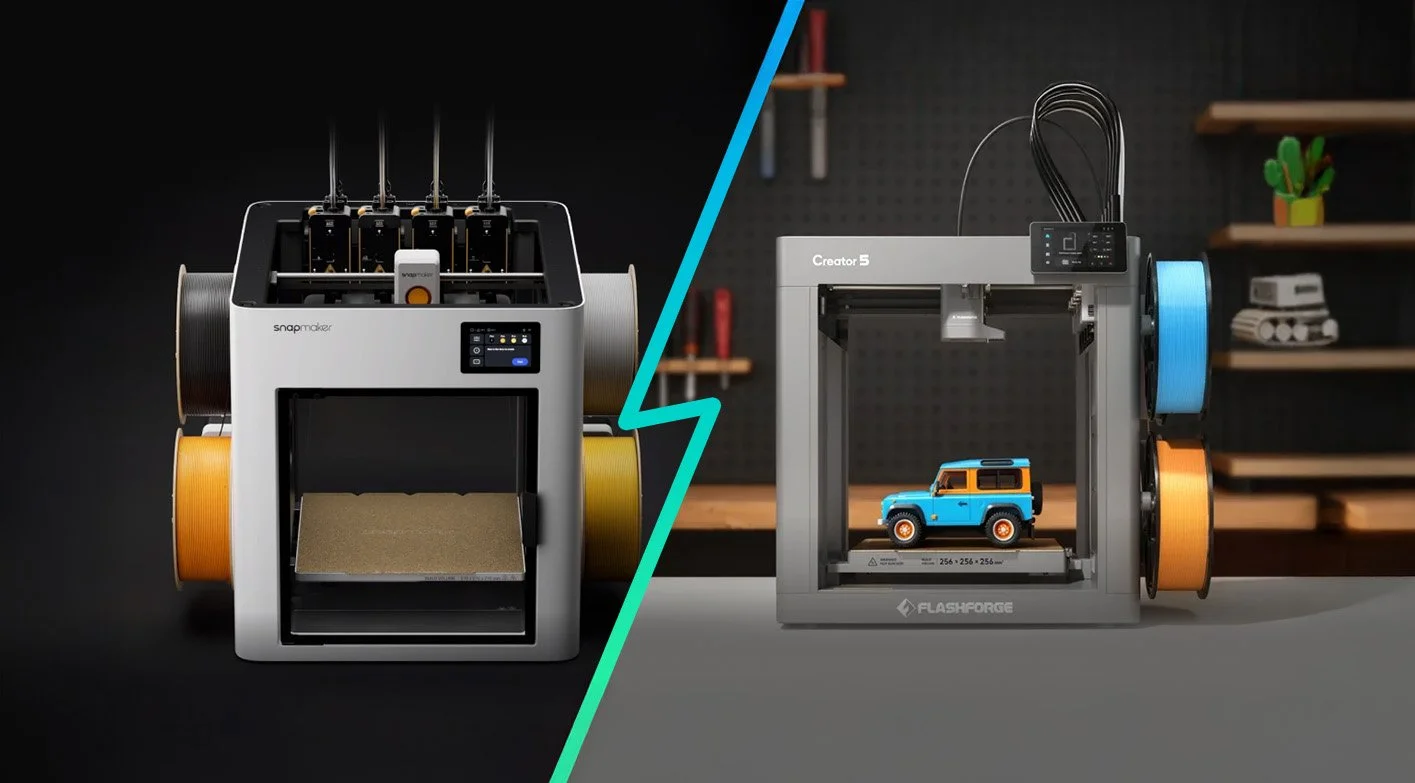
Quick Verdict: The Snapmaker U1 (from $849) is slightly more refined in software and open-source aspects with slightly larger build volume, while the Flashforge Creator 5 (from $699 / $849 ) is the better value with faster speeds, and comes from a manufacturer with a strong track record. My personal experience with the Creator 5 pro is great! Save extra $30 with 3D Print Tech Design code here
Since tool changer 3D Printers started popping up, a four-toolhead machine meant either Prusa XL (~$2,299+), the now discontinued E3D Toolchanger or a full DIY project. The Snapmaker U1 changed that, and it's been shipping since late 2025, raised over $20 million on Kickstarter, and has earned strong reviews across multiple publications. Now Flashforge is pushing even further with the Creator 5 at $649 (and the Pro at $849), undercutting the U1 on price while also claiming higher speed on paper.
So which one should you buy? And how do they compare to the other serious contenders; Prusa XL, Bondtech INDX on Core One, and the Bambu Lab H2C? That's what this review is here to sort out.
➡ Check current Snapmaker U1 pricing — shipping now
➡ Check current Flashforge Creator 5 pricing (Or via Amazon here)
Specs at a Glance: Snapmaker U1 vs Creator 5 (and the Competition)
The table covers all five serious contenders in the affordable “tool-changer” space right now.
| Feature | Creator 5 | Creator 5 Pro | Snapmaker U1 | Prusa XL (5T) | Bondtech INDX+ Core One | Bambu H2C |
|---|---|---|---|---|---|---|
| Price | $699 | $849 | $849 | $3,899 (assembled) |
$2249 (assembled) |
$2,399 |
| Type | Tool changer | Tool changer | Tool changer | Tool changer | Lightweight tool changer | Nozzle changer |
| Max tools | 4 | 4 | 4 | 5 | Up to 8 | 7 Vortek nozzles |
| Build Volume | 256³ mm | 256³ mm | 270³ mm | 360³ mm | ~250×210×220 mm (est. w/ INDX) |
330×320×325 mm |
| Max Speed | 600 mm/s | 600 mm/s | 500 mm/s | 350 mm/s | 600 mm/s | 600 mm/s |
| Max Accel. | 30,000 mm/s² | 30,000 mm/s² | 20,000 mm/s² | 4,500 mm/s² | 20,000 mm/s² | 20,000 mm/s² |
| Slicer | Flash Studio / Orca-Flashforge / OrcaSlicer | Flash Studio / Orca-Flashforge / OrcaSlicer | Snapmaker Orca / OrcaSlicer / Fluidd (web) | PrusaSlicer (open source) |
PrusaSlicer + Klipper variants | Bambu Studio |
| Firmware | Proprietary (+OrcaSlicer) | Proprietary (+OrcaSlicer) | Klipper (open source) | Open source (GPLv3) | Klipper / Marlin / RRF | Proprietary |
| Purge waste | Near-zero (prime tower rec.) |
Near-zero (prime tower rec.) |
Near-zero (prime tower rec.) |
Near-zero (prime tower rec.) |
Near-zero | Small prime tower still needed |
| Enclosure | Open frame | Enclosed +65°C chamber (H13 HEPA + carbon) |
Open + $149 cover (HEPA) | Optional official enc. | No | Enclosed +65°C chamber |
| TPU / flex | Yes | Yes | Yes | Yes | Yes | Limited |
| Ships | Now | Now | Now | Now | On backorder | Now |
A few things worth mentioning:
The Snapmaker U1 is not including an enclosure or heated chamber
Prusa XL firmware is open source — published on GitHub under GPLv3 (link to source).
The Tool changers are recommended to use a prime tower, but needs no purge per say.
Both U1 and Creator 5/5Pro handle TPU very well — direct-drive extruders on both machines make flexible filaments manageable without an enclosure.
SnapSwap vs FlashSwap: The Core Technology
The core mechanic is the same on both: the carriage drops one toolhead onto its dock, picks up the next, and keeps printing. Each head stays pre-heated and ready while the others work — no filament to retract, no nozzle to flush (although it does purge to ensure nozzle is ready to go). The result is near-zero waste and swaps measured in seconds rather than minutes.
Left: Snapmakers 3-point alignment with center rod-grabbing. Right: Flashforge centerlocking mechanism.
Snapmaker U1 — SnapSwap
Tools park at the rear using steel-ball kinematic couplings, a precision docking system rated to “1,000,000+ cycles”. Swap time confirmed by independent reviewers: 10–12 seconds.
Flashforge Creator 5 — FlashSwap
Tools park on the right side of the machine, and they use a different center-locking mechanism with alignment in. Looks to be very fast as well, my personal testing (with prime tower) puts a real-world swap at 22 seconds.
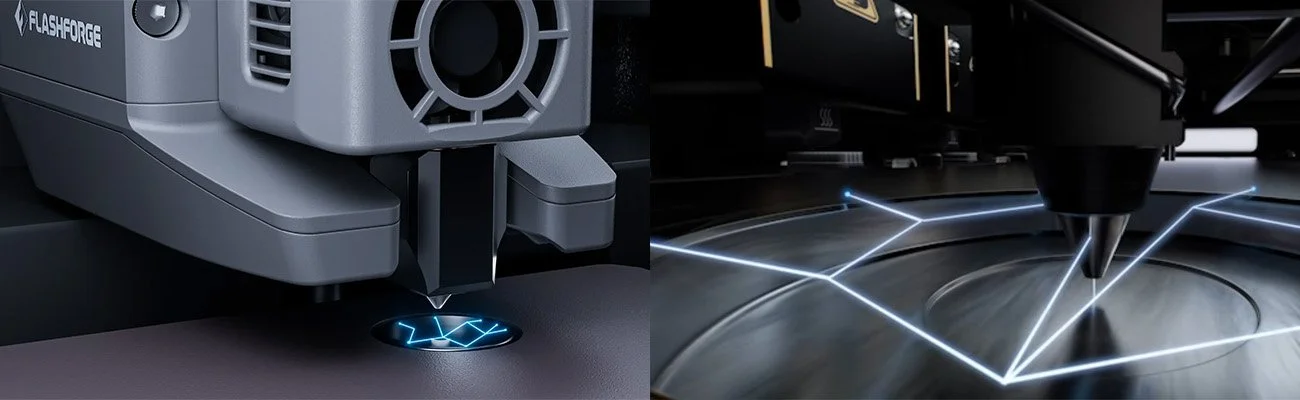
Flashforge Creator 5 (on the left) use the same calibration system for individual tools as Snapmaker U1 does. This should ensure fantastic accuracy.
Print Speed: 600 mm/s vs 500 mm/s — Does It Actually Matter?
On paper the Creator 5 is faster with it’s 600 mm/s travel speed and 30'000 mm/s² acceleration vs the U1's 500 mm/s and 20'000 mm/s². In practice, real print speeds are lower than these advertised numbers, while acceleration might make a real difference in some cases.
The more important speed story for tool changers is swap time, not travel speed. Single-nozzle systems like the Bambu AMS spend 40–90 seconds per color change. The U1 does it in 10–12 seconds (without prime tower?). Even if the Creator 5 Pro does double that, the difference on a complex print is modest (but real).
What both machines do is completely outpace single-nozzle multi-material printers in total job time (and waste), and that gap is the one that actually matters in practice
In my comparison with a Bambu Lab P1S printer on a typical 4-color print, the toolhead swapping (even with 22 seconds) reduced the print time to 15 hours from 51 hours with an AMS system. And it saved us just over 500g of purging waste.
Klipper vs Proprietary Firmware: Slicer & Software Compared
Firmware choice shapes the ownership experience and is a critical factor for some users. Slicer options, third-party tools and long-term repairability are factors that matter. The two machines take different approaches.
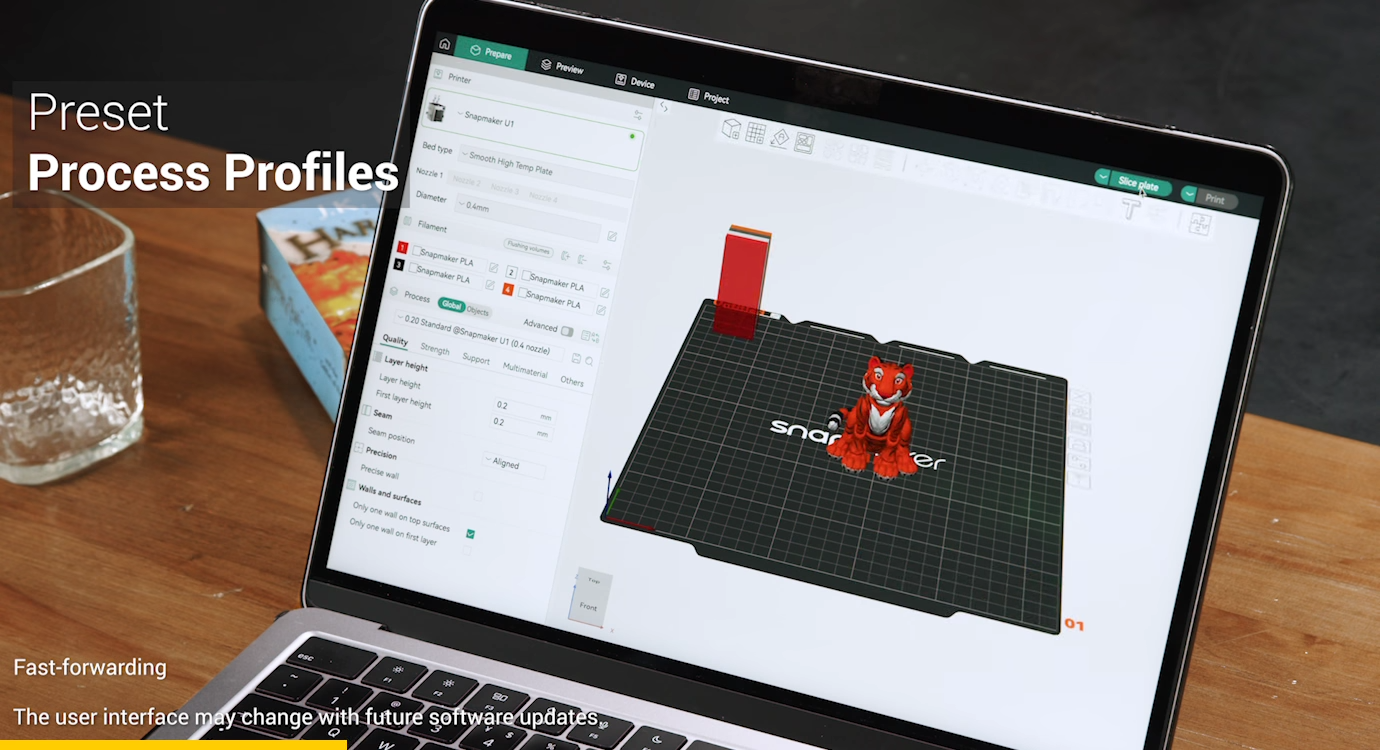
Snapmakers Orca slicer fork. Looks very familiar to anyone using Bambu Studio or Orca slicers from before.
Snapmaker U1 — Klipper-based, plug-and-play in practice
Day-to-day, the U1 is plug-and-play with their Snapmaker Orca (snapmakers fork of OrcaSlicer) with pre-tuned material profiles. You can remotely manage and monitor your printer via the Snapmaker App. Camera feed, pause, cancel, remote start: all built in, no setup needed. Most users will never need to look further than this.
Under the hood it runs Klipper, which opens up for modders. You can get browser-based control via Fluidd, AI failure detection via Obico, Moonraker API access for farm dashboards, and it works without any firmware modifications.
The long-term benefit is that if Snapmaker's cloud disappears in a few years, the printer still works exactly the same. You're not dependent on their servers for anything.
Flashforge Creator 5 — Proprietary firmware with OrcaSlicer fallback
The Creator 5 runs Flashforge's own firmware, paired with Flash Studio (new desktop software coming) and the Flash Maker mobile app for remote monitoring and control. Orca-Flashforge and standard OrcaSlicer are both supported, which is the important safety net. If Flash Studio disappoints at launch, you're not stuck.
Flash Studio is actually just a veriosn of Orca slicer, but noticable in the fresher stages. For me, the device management is a little behind, but versions are dropping almost weekly right now.
Flash Studio and the phone app actually handles multi-printer setups really well if you’re keen on starting your own small print farm.
Bottom line: For everyday printing, both machines are perfectly fine; Snapmaker Orca, Flash studio and Orca Slicer are effectively the same slicer engine anyways. The Klipper advantage matters if you want deeper integrations, farm management tools, or just prefer knowing your printer doesn't rely on any company's cloud to keep working.
Update: We’ve seen rumors that Creator 5 and Creator 5 Pro will be able to run open firmware as well (klipper for example). Details remain unclear.
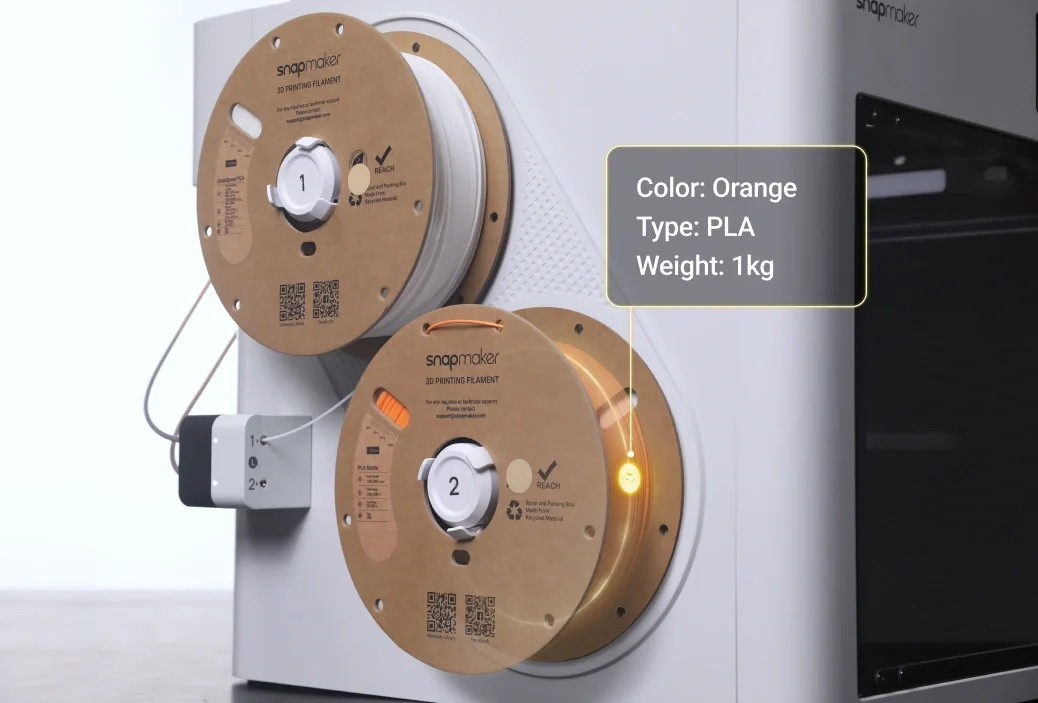
Snapmaker U1 has a NFC-reader that can automatically read what material that is loaded.
Print Farm & Multi-Unit Use: Approachable vs Capable
Tool changers open up multi-color and material jobs that weren't practical before. This and the lower price, makes them interesting in multi-printer environments like print farms, businesses or schools. But the two machines approach shared-use from very different directions.
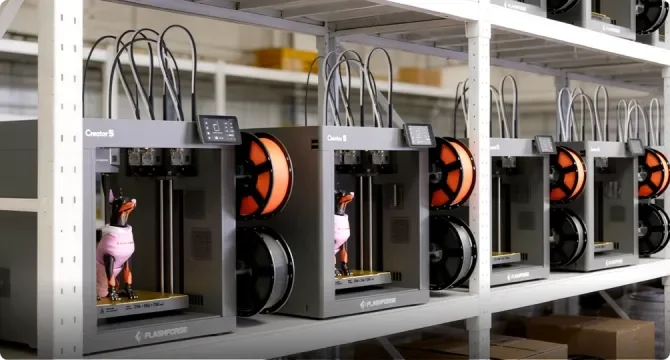
Is it potentially easier to access Flashforge Creator 5 toolheads from the side, rather than the back?
Flashforge Creator 5 — Easier to manage at scale
The Creator 5's side-mounted tool rack means everything (spools, toolheads, cables) is accessible from one side without moving the machine, which matters in racked or tight setups. Fleet management is built into Flash Studio and the whole experience stays within a single contained ecosystem. No API configuration, no network setup beyond basic Wi-Fi.
For schools, makerspaces, or companies where multiple people operate the printers without a dedicated technical person behind them, this is the right fit. The one downside is the non-automated material feeding. To change filament you have to push the filament up to the extruder when the machine is ready to load.
Snapmaker U1 — Higher ceiling, more setup required
The U1's Klipper/Moonraker base makes multi-printer monitoring genuinely possible. Mainsail's farm view for example, can aggregate multiple U1s into a single dashboard by pointing it at each printer's IP address. There's also active community development around integrations like Spoolman and custom monitoring setups.
But this isn't plug-and-play. Getting these tools running requires comfort with network configuration and the Klipper ecosystem. Obico integration, AI failure detection across machines is theoretically possible via Moonraker, but isn't confirmed as a simple setup on the U1 yet. The community is working on it.
If you have a technical operator and want the flexibility to build out a proper farm management setup over time, the U1's open stack gives you that room. If you don't, the Creator 5 is the more practical choice.
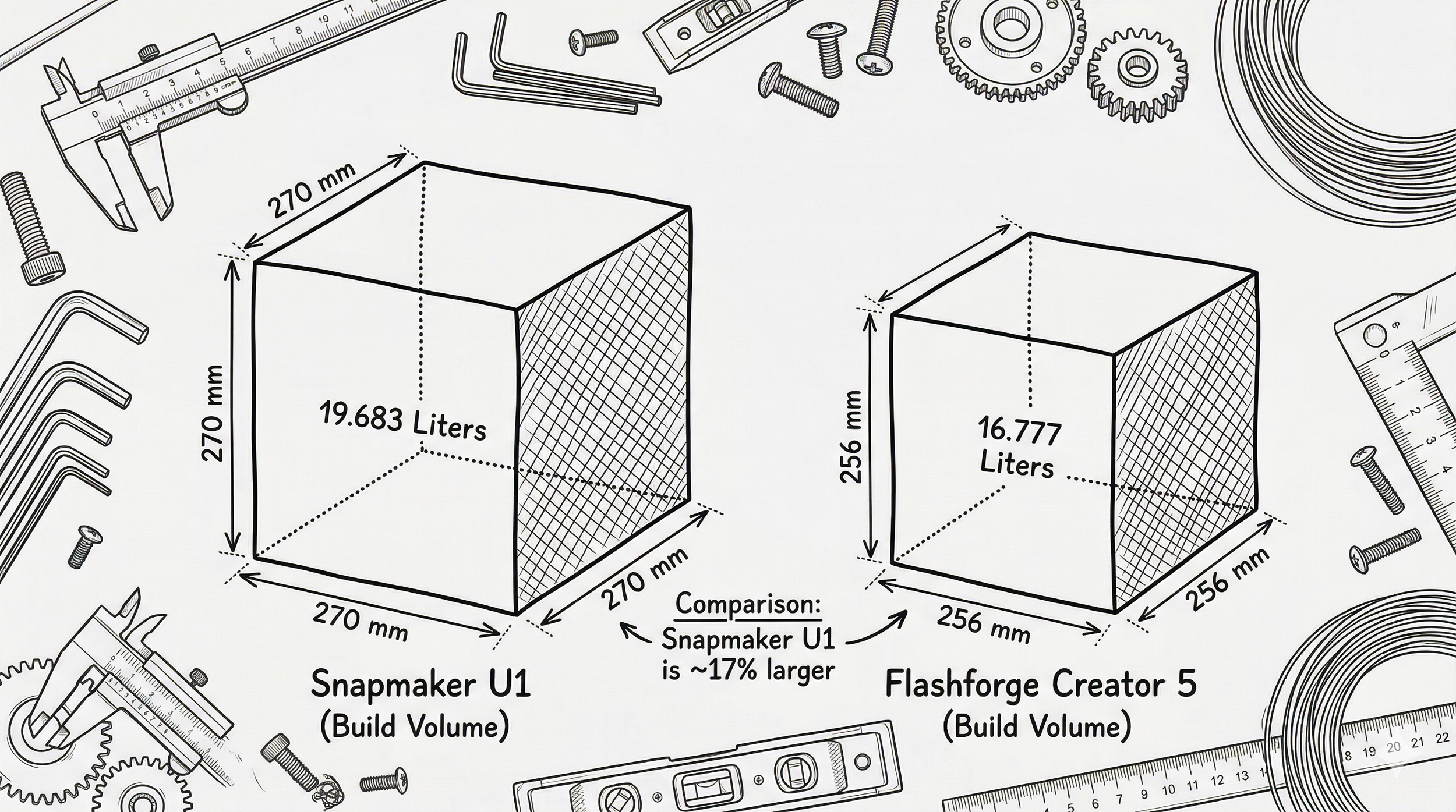
Handy visual illustration comparing the build volumes (AI generated). The difference is there, but no huge difference.
Build Volume and Usable Print Space
The U1 has a 270 × 270 × 270 mm build volume. The Creator 5 has 256 × 256 × 256 mm. That 14 mm difference per axis matters because both printers recommend placing a small prime tower on the bed during multi-color jobs. That tower occupies bed space…
Considering that a ton of models have been created to fit Bambu Lab 3d printers at the ~250mm cubed build volume with AMS (no prime tower needed) you could technically more often end up having a too small volume if you max out the area and can’t fit a prime tower.
From my own experience, very few models take up over 220mm, and when they do they end up being more like 300-350mm if I didn’t have to design it in parts… But this obviously vary for all users! I’m just saying that the extra 14mm isn’t often the extra volume you needed.
Reality check: Both U1 and Creator 5 / 5 Pro can prime inside the print, but there are reports of worse quality when you do that.
Note: Purge and Prime are different. Purging means replacing the whole material in an extruder, removing residues from a color before using another. Like removing the black material before printing white, so you get clean color. When priming, the nozzle just ensures there’s enough material in the nozzle so it’s ready to extrude. Kinda like when you’re about to use a ketchup. You need to “flick” the bottle so all ketchup is at the nozzle, otherwise you get the funny farting sounds which is ketchup mixed with air.
Worth Knowing: The Bondtech INDX + Prusa Core One
The Bondtech INDX is a lightweight tool-changer upgrade for the Prusa Core One, developed jointly by Prusa Research and Swedish extruder specialists Bondtech.
Rather than swapping entire toolheads, it uses a single Smart Toolhead on the gantry with induction heating and contactless temperature sensing. The tools themselves are passive, just a filament path and nozzle, no wires or electronics.
There are reports of problems and confusion about nozzle hardness and reliability. But they are hugely popular although the price is increased from its initial release. Still, you’d be lucky to get one before end of 2026!
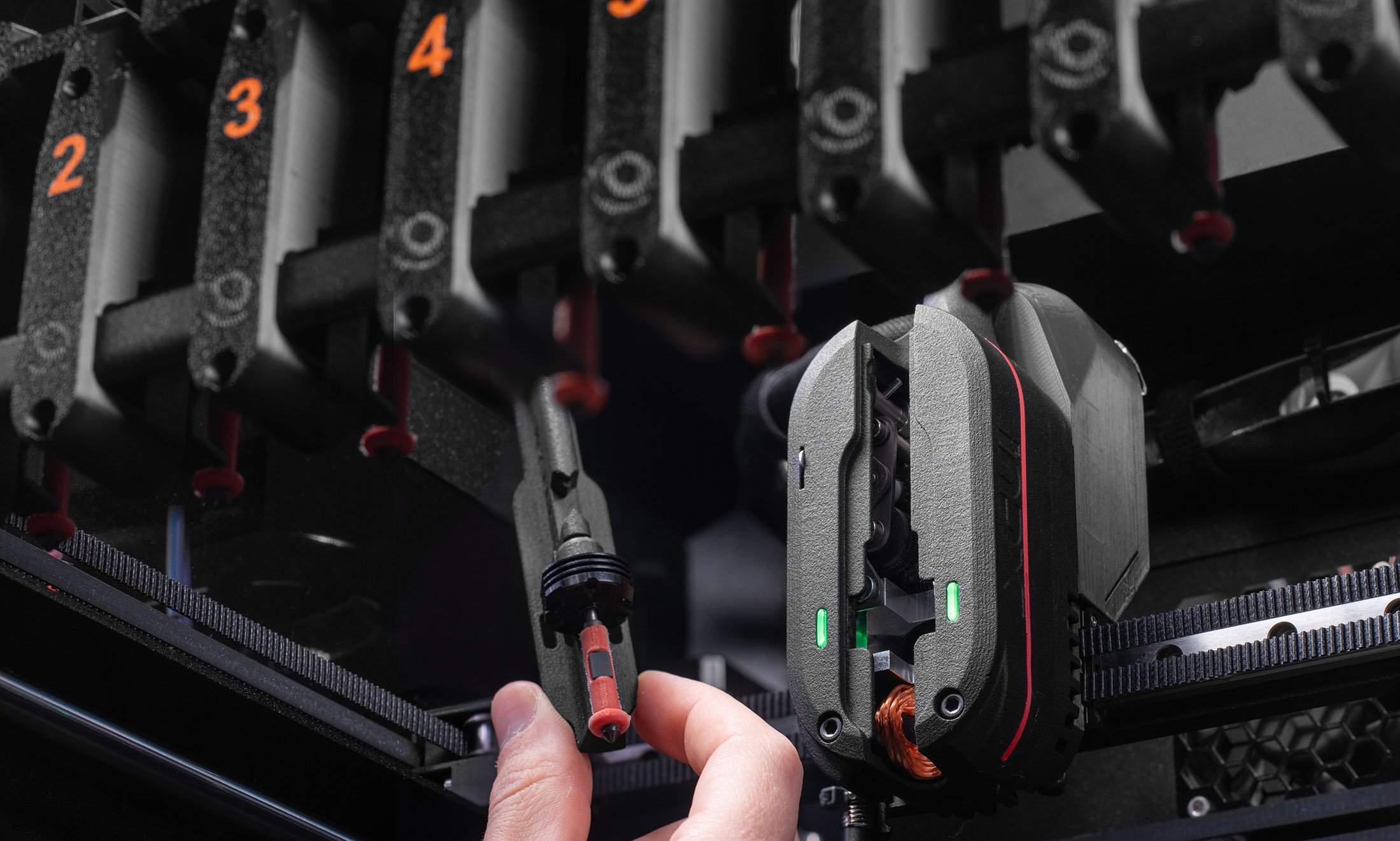
The clever Bondtech INDX on a Prusa Core One is a clever solution and enables up to 8 color/materials.
Starting at 4 tools and expanding to 8, the total cost for an assembled Core One+ with 4-tool INDX kit works out to roughly $2249 That's more than the U1 or Creator 5, but it gets you up to 8 materials, Klipper-based firmware, and both Prusa's and Bondtech's track records behind it. I also expect this system to move into even more DIY-style printers like Voron and similar.
Where it fits: If 4 colors isn't enough and you want a path to 8 materials with Klipper and PrusaSlicer, the INDX + Core One is worth considering. The trade-off is a smaller build volume than the XL and still-limited availability.
➡ Learn more about the Bondtech INDX + Prusa Core One
Pricing: The Creator 5's Biggest Argument
At MSRP $799 (now $699 before our discount code) vs the U1's $849 (MSRP: $999) the Creator 5 undercuts by a lot Here's the full picture:
| Configuration | Flashforge Creator 5 | Flashforge Creator 5 Pro | Snapmaker U1 |
|---|---|---|---|
| Base price | $799 | $949 | $999 |
| Sale price (Sep 2026) | $699 | $849 | $849 |
| Enclosure / cover | N/A | Included | ~$149 top cover (HEPA) |
| Ships | Now | Now | Now |
The Creator 5 / 5 Pro are now past their special launch campaign but is currently on sale. And our discount code below saves you some extra:
➡ Creator 5 and Creator 5 Pro pricing — Use Code ‘3DPTD30’ for $30 extra on top of existing deals!
Who Is Each Machine For?
Buy the Snapmaker U1 if:.
Klipper, Moonraker, and open-source longevity is essential for your workflow
You're running multiple printers and need custom monitoring via Obico or similar tools
You want automatic filament loading
The 270 mm bed is critical for you.
Buy the Flashforge Creator 5 or 5 Pro if:
You want a tool changer and the lowest price is important.
You're setting up for a school, makerspace, or company where plug-and-play matters more than API depth.
You're either mainly printing PLA, PETG, TPU, and materials that work fine on an open-frame machine
Or you need the Creator 5 Pro for engineering grade materials with 65C heated chamber
Consider the Bondtech INDX + Core One if:
4 colors isn't enough. You want expandability up to 8 materials
You want Klipper + Prusa's open ecosystem without paying for the full Prusa XL
You're willing to wait due to short supplies
Wait or step up further if:
You want the most proven, large-format and best multi-material platform regardless of price? The Bambu LabH2C and Prusa XL are your best options.
My Verdict
Iv’e just released my own Flashforge Creator 5 Pro review and know how well it delivers at it’s price point. For me it appears to be the better value for the majority of users. A 4-toolhead CoreXY tool changer starting at $699 from a company with a long track record of building good hardware like the original Finder all the way through to their enterprise line is comforting.
OrcaSlicer support, the right-side tool access design, and the $200 saving over the U1 are all real advantages.
But the Snapmaker U1 is not a compromise. It shipped to over 20,000 backers, earned strong reviews and for anyone who wants a sleek toolchanger with open software support and a larger volume, this might just be it.
Either way you're entering the fast tool-changer era at a highly competitive price.
➡ Check current Snapmaker U1 pricing and availability
➡ Get the Flashforge Creator 5 / 5 Pro
Flashforge Creator 5/5Pro unique discount code: extra $30 off current deals (EU and US ONLY) Use code 3DPTD30 at THIS LINK. Creator 5 Pro = $819 / Creator 5 = $669
(Affiliate links. Using them supports this blog at no extra cost to you. Thank you!)
Frequently Asked Questions
Is the Flashforge Creator 5 better than the Snapmaker U1?
It depends on what you need. The Creator 5 is better value on price — $200 cheaper at every tier — and claims faster speeds. The U1 is better on availability and confidence: it's shipping now with strong independent reviews, runs open-source Klipper firmware, and has a slightly larger 270 mm build volume. If you want proven hardware today, get the U1. If you can wait until May and value the saving, the Creator 5 is the smarter buy — assuming Flashforge delivers.
Is the Snapmaker U1 shipping now?
Yes — the Snapmaker U1 is in stock and shipping now. It began shipping to Kickstarter backers in late 2025, and retail units are available through the Snapmaker store and authorised resellers. The Flashforge Creator 5, by comparison, ships in early May 2026.
Can the Snapmaker U1 print TPU?
Yes. The U1's direct-drive extruders handle TPU and other flexible filaments reliably. Each toolhead drives filament close to the hotend, which is what makes flexible materials manageable — Bowden tube setups struggle with flex. TPU is officially listed as a supported material. Snapmaker even carries TPU in their filament range.
Can the Snapmaker U1 print carbon fiber filament?
Yes, but you'll need a hardened steel nozzle. Abrasive filaments like PLA-CF and PETG-CF eat through standard brass nozzles quickly. The U1 supports hardened steel nozzle options — make sure you're not running a brass nozzle if you're printing carbon fiber composites regularly.
Can the Snapmaker U1 print nylon or ASA?
With difficulty on the standard open-frame machine. Nylon and ASA are prone to warping from ambient temperature changes — they really want an enclosed environment. The optional U1 top cover ($149) adds passive heat retention and HEPA filtration, which helps somewhat. For serious nylon or ASA work, a fully enclosed machine like the Bambu H2C or Prusa XL with enclosure is a better choice. The Creator 5 Pro (when it eventually launches) would also address this.
Can the Snapmaker U1 print polycarbonate (PC)?
Not reliably on the standard open-frame setup. PC needs high nozzle temperatures (260–300°C+), a heated enclosure, and a very dry filament. The U1's hotend reaches 300°C which is within range, but the open frame means too much heat loss for consistent results with PC. The top cover helps at the margins, but a proper heated chamber is really needed for PC.
Is the Snapmaker U1 Klipper-based?
Yes. The Snapmaker U1 runs Klipper firmware with Moonraker for API management and Fluidd as the web client. Snapmaker has modified Klipper and added their own management layer on top, and the full modified source is being released as open source. This means the U1 integrates with standard Klipper ecosystem tools — including Obico for remote monitoring and AI failure detection — without needing Snapmaker's own cloud services.
Which slicer does the Snapmaker U1 use?
The primary slicer is Snapmaker Orca — Snapmaker's fork of OrcaSlicer, with pre-tuned profiles for their official filament range and machine models. Standard OrcaSlicer also works and is fully supported. The Snapmaker App handles remote monitoring and print management from your phone. You can also access and control the printer directly via the Fluidd web client in your browser without any app.
What is the Snapmaker U1 build volume?
The Snapmaker U1 has a 270 × 270 × 270 mm build volume. That's slightly larger than the Flashforge Creator 5 (256 × 256 × 256 mm) and the Bambu P-series, but smaller than the Prusa XL (360 × 360 × 360 mm) or the Bambu H2C (330 × 320 × 325 mm). In multi-colour printing, bear in mind that a small prime tower takes up some of that footprint.
Is the Snapmaker U1 enclosed?
No — the Snapmaker U1 is open-frame in its standard configuration. An optional top cover is available for $149, which adds passive heat retention for slightly better high-temp material performance, plus a HEPA air filter. It's not a fully heated enclosure. For materials like ABS, ASA, or nylon that genuinely need an enclosed environment, the top cover helps at the margins but isn't a substitute for a proper enclosure.
How loud is the Snapmaker U1?
Around 55 dB at normal print speed — about as loud as a quiet fan or a typical office environment. That's comparable to most modern CoreXY machines and noticeably quieter than older printers. The U1 has a silent mode that reduces noise further if needed.
Is the Snapmaker U1 reliable?
Based on available reviews, yes. Tom's Hardware, Make: Magazine, and All3DP have all tested the machine and found it performs consistently. The SnapSwap kinematic coupling is rated to over 1,000,000 swap cycles. Early beta units had some minor software issues, but these were resolved before retail launch. No major hardware reliability concerns have surfaced in the first months of shipping.
Is the Snapmaker U1 worth it?
Yes, for the right buyer. If you want a tool changer that works now, without the learning curve of a Voron or the price of a Prusa XL, the U1 is the most straightforward way in. You get 4-colour tool-changing, near-zero purge waste, Klipper firmware, and a well-reviewed machine at $849–$999. The main limitation is the open frame — if you need ABS or ASA, you'll need the top cover at minimum, and ideally a fully enclosed alternative.
Does the Bambu H2C need a prime tower?
Yes — the Bambu H2C still uses a prime tower when switching between Vortek nozzles. The Vortek system reduces waste significantly compared to AMS-style single-nozzle purging, but it doesn't eliminate the tower entirely. The same applies to the Snapmaker U1, Flashforge Creator 5, and Prusa XL: all recommend a small prime tower for nozzle-tip cleaning between tool changes. The volume is dramatically less than a standard AMS purge tower, but it's not zero.
Can the Flashforge Creator 5 print ABS and ASA?
No — not reliably. The standard Creator 5 is open-frame, which means ABS and ASA will warp from ambient temperature changes during printing. Flashforge has announced a Creator 5 Pro with a 65°C heated enclosure for engineering materials, but it hasn't launched yet and pricing is unconfirmed. For ABS or ASA work right now, the Prusa XL with its optional enclosure or the Bambu H2C are better options.
Does the Flashforge Creator 5 work with OrcaSlicer?
Yes. Both standard OrcaSlicer and Orca-Flashforge (Flashforge's own fork) are officially supported alongside Flash Studio. This is an important fallback — if Flash Studio disappoints at launch, OrcaSlicer is a mature, actively maintained alternative.
What is the Bondtech INDX and should I consider it?
The Bondtech INDX is an upgrade kit for the Prusa Core One that adds up to 8-material tool-changing using induction-heated passive tools. Each passive tool costs around $35, making it affordable to expand from 4 to 8 colours. A 4-tool setup on an assembled Core One costs roughly $1,818; 8 tools brings that to around $2,018. It runs Klipper and is backed by Prusa Research and Bondtech. Retail sales open Q2 2026 — worth considering if 4 colours isn't enough and you want Klipper with room to grow.
When does the Flashforge Creator 5 Pro come out?
No release date has been confirmed yet. Flashforge has acknowledged the Creator 5 Pro in their documentation — it will feature a fully enclosed chamber with active heating up to 65°C for high-temperature materials like ABS, ASA, and PA-CF. It cannot be upgraded from the standard Creator 5, as the two have structural differences. Pricing is unannounced. Update: this article will be updated as soon as Flashforge releases Pro details.
Is the Prusa XL firmware open source?
Yes. The Prusa XL firmware — along with all Prusa Buddy-based firmware — is published on GitHub under the GNU General Public License v3.0. Prusa has an established open-source history, and community developers have full access to the source. You can flash custom firmware after breaking the appendix pin on the board. This is notably different from Bambu Lab's proprietary firmware model.
