
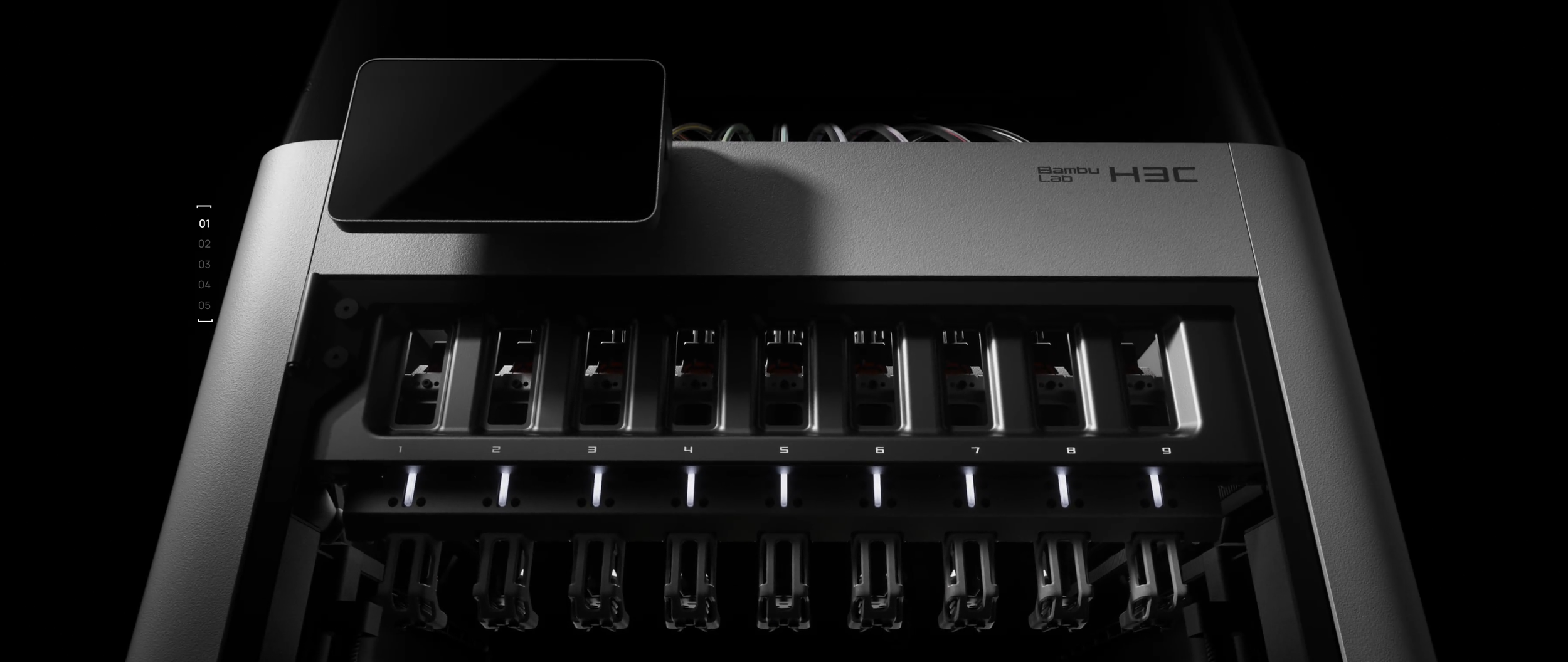
First, a quick summary of the H3C Highlights before we break down what isn’t in the specs. Complexity, Quality and Compromises that can make or break the H3C for your application.
| Launched | 3 November 2026 |
|---|---|
| Price | $2,499 / €2,499 / £2,199 |
| What you get | H3C AMS Combo: printer + AMS 3H (the AMS is the top cover, not optional) |
| Availability | Backlogged - Orders ship around Nov 30, 2026 |
| Tools | 9 Swaptek tools, actively heated in the dock; tool 8 is the 2.85 mm tool |
| Tool change | Under 6 s claimed. 6–7 s print-to-print, 10 s+ with prime-tower contour, measured (CNC Kitchen) |
| Build volume | 330 × 320 × 325 mm |
|---|---|
| Chamber | Actively heated, up to 65 °C |
| Nozzles | Hardened steel, 0.4 mm standard; 0.2 / 0.6 / 0.8 optional; mixed sizes in one print; 350 °C max |
| Filament | 1.75 mm on eight tools; 2.85 mm on the TPU tool. TPU 75A from Bambu, 60A demonstrated |
| Waste per change | No purge; about 50 mg prime per tool change, measured (CNC Kitchen) |
| Connectivity | Wi-Fi 6, cloud, LAN-only or offline. No Ethernet |
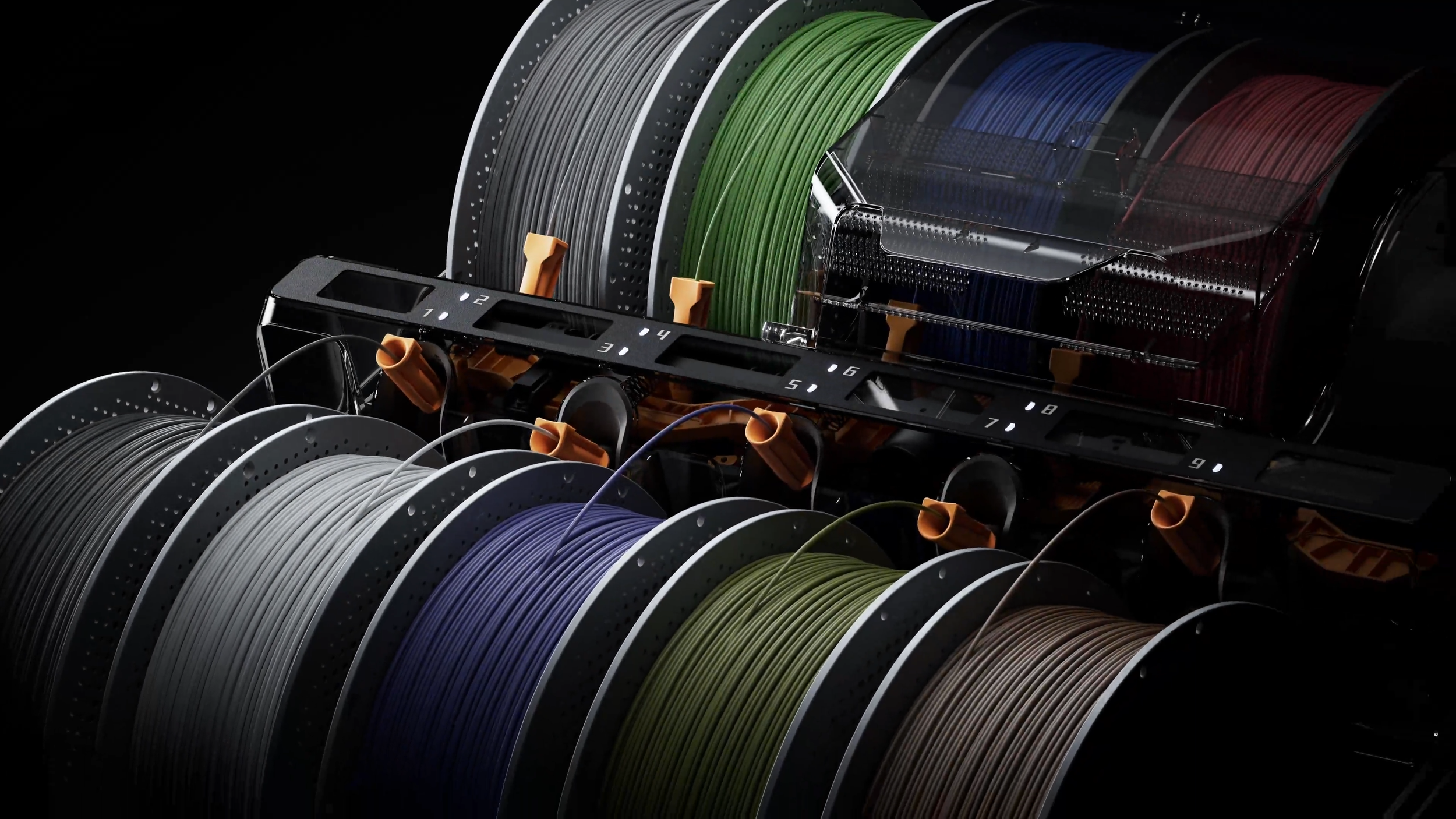
| AMS 3H | 9 spools, sealed, RFID. Two-slot dryer compartment to 85 °C, runs while printing (separate power socket). Up to 24 materials with four extra AMS units on tool 1 |
|---|---|
| Bundles | $2,589 with PLA Palette and TPU 75A · $2,799 with Bambu Station · $3,049 with enclosed Station and E1 air purifier |
The Bambu Lab H3C Tool change process
Why is H3C a tool changer when H2C was Vortek
Bambu Lab already had a good thing going with the 1+6 tool changing Vortek system on the H2C, so what makes a toolchanger better?
One of the main arguments is that although H2C reduces swapping times and priming by dedicating a tool to each filament. However it still uses one AMS and one line in to each nozzle.
In the H3C, each toolhead not only has a dedicated filament path that doesn’t have to fully retract for each tool change, each tool also has it’s own heater, meaning filament can be at idle-temperatures when not in use, and pre-heat just before being activating. This significantly reduces tool change times down to 6-10 seconds according to testing by CNC kitchen.
Bambu Lab also made use of the fact that each toolhead can have their own materials, and added a 2.85mm filament TPU-tool head. Since the diameter of such filament is much bigger, even a soft 60A TPU appears stiffer, and can not only be extruded reliably, but fast.
The H3C system is similar to what both Bondtech INDX and Creality K3 Klitek uses, while it differs a bit from Flashforge Creator 5 and Snapmaker U1.
| Machine | Parked tool | Heating | Filament | Change | Waste |
|---|---|---|---|---|---|
| AMS single nozzle | none | always hot | retracts, purges | ~75-90s | 30-150mg |
| Bambu H2C | hotend | induction on pickup | retracts | ~30-40s | 30-120mg |
| Prusa Core One INDX | hotend | induction on pickup | follows tool | 12–16 s | 13 mg |
| Creality K3 | hotend + heater | heater in tool | follows tool | 15s claimed (with tower) | TBD |
| Bambu H3C | hotend + heater | heater in tool | follows tool | 6–7s | 50 mg |
| Flashforge Creator 5 Pro | hotend + gears | heater in tool | follows tool | 22s | ~35mg |
| Snapmaker U1 | whole head | heater in tool | follows tool | ~10-12s | 35-75mg |
| Prusa XL | whole head | heater in tool | follows tool | ~12-17s | ~18mg |
Multi material benefits
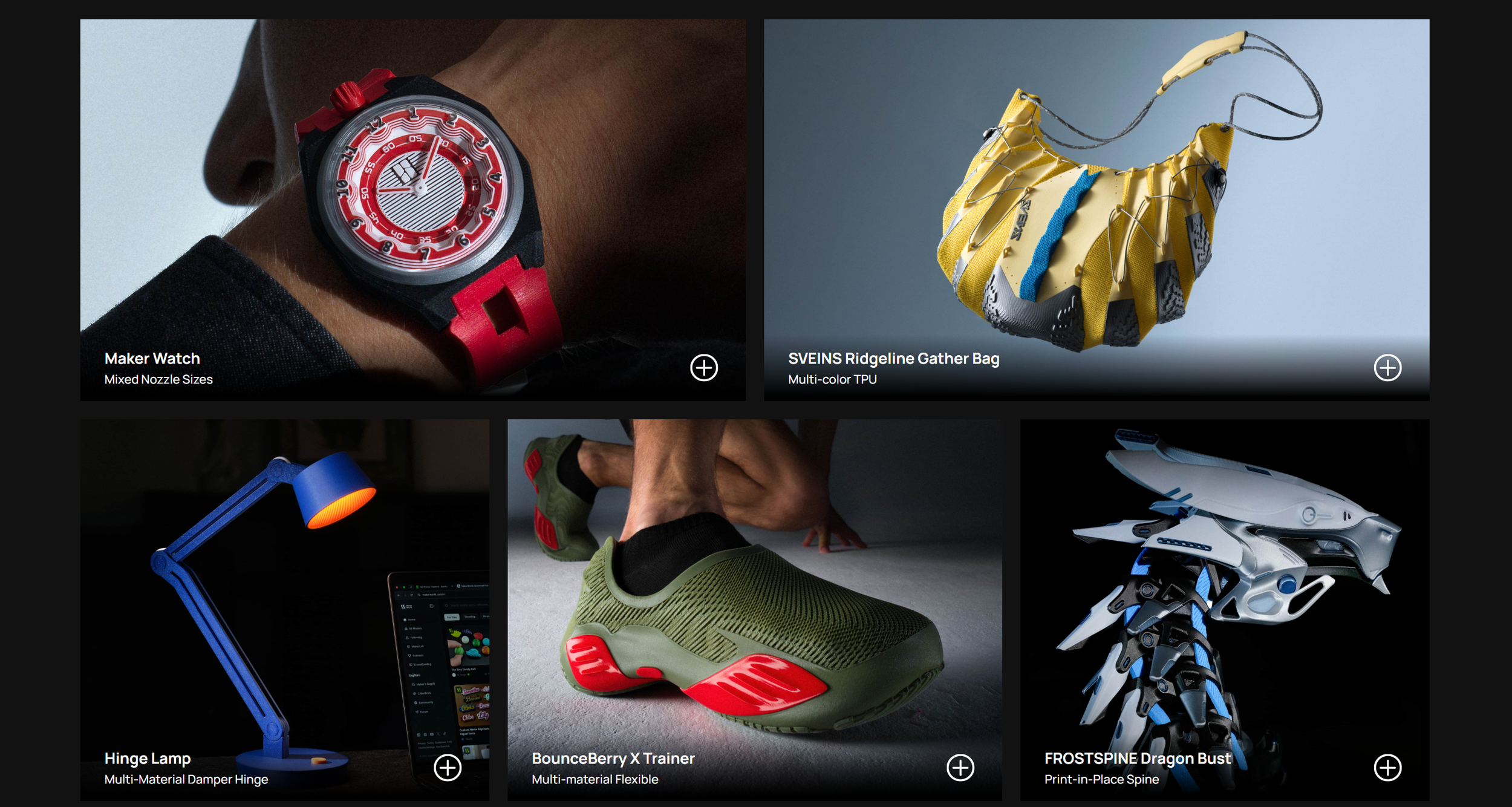
Bambu Lab H3C and the individual tool heads are great for multi material printing compared to a single extrusion machine, just like the H2C. With hardened nozzles, 2.85mm TPU toolhead and different nozzle diameters in combination with a heated chamber and 350C hotend, you can really do exciting combinations of materials.
The threshold to actually mix materials becomes almost painless whenever they are loaded, which is really exciting for those that want to use support interface layers, but might not due to only having a single extruder. You can also much faster add a quick color-logo, soft features or finish differences is materials.
On top of that you get much more flexibility in multiple nozzle use in the same project. Although support is there, the level of mixing might still have its limits.
Where the H3C compromises come through
First of all, I’m really impressed with the price for the H3C and all the features packed into it. This really looks to be the best toolchanger in this larger-print volume category, however I’m not convinced it’s a full sweep, best for all, slam-dunk that you might think.
The overall design looks great, but when we look closer at how early reviewers like CNC kitchen uses the machine, it’s obvious there are drawbacks. We’ll come back to print quality in a bit, but the handling of all these materials for all toolheads is complex and includes several pain points.
If you want to use more than 9 filaments or colors in a print, only the first toolhead connects to one or more AMS units via a hub. you can’t route 4 different AMS to 4 tools for higher production. At least not yet.
Don’t forget one tool is only for 2.85mm TPU, so you’re already down one for multi color projects (without super soft TPU) unless you buy a new one and go through the really painful process of replacing the cables and toolhead install.
The AMS 3H is large and bulky! And a lot of operations seems to require you to open it’s sides and route filament through “direct feed passthrough” and through holders along the PTFE tubes. This is a big step for the simplicity we’ve been used to when using machines like the H2S, P2S and so on.
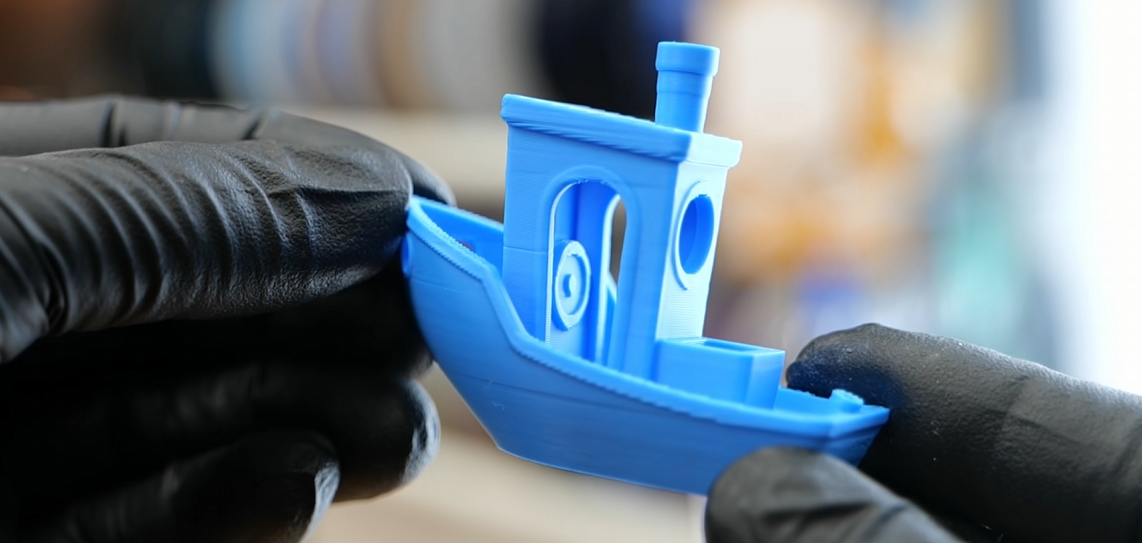
Image from CNC Kitchen H3C Video on YouTube. I’m not impressed, although the 3D Benchy is designed to push a machine.
The print quality is far from expected - but is it bad?
When I watched the initial YouTube reviews (i wasn’t lucky enough to get a review unit myself this year) I see a lot of print quality issues that I didn’t expect from Bambu Lab. "ghosting”, dodgy start/stop, weird artifacts around speed-changes for example. Some closer looks at CNC kitchens prints show colors not perfectly matched.
Honestly, I don’t think it looks worse than other tool changers, but it appears worse than my P1S Combo on some single-color prints…
I suspect much of the problem lies in the tools and calibration I think… The types of quality defects looks very similar to all other tool changers i’ve seen, and similar to what I see on my Creator 5 Pro. Swapping tools is not easy when you think about the precision needed. and the forces the toolhead has to endure when moving around. Any tiny offset on the nozzles position from calibration will result in bad mixing of materials.
The extrusion is also different from their other machines, and we saw on the X2D, with its second “auxiliary bowden extruder” that the perfected direct-drive extrusion we know Bambu Lab from isn´t a given when they move to other versions. With that said, the X2D has improved after launch, and I suspect the H3C profiles will be tuned over the coming months as well.
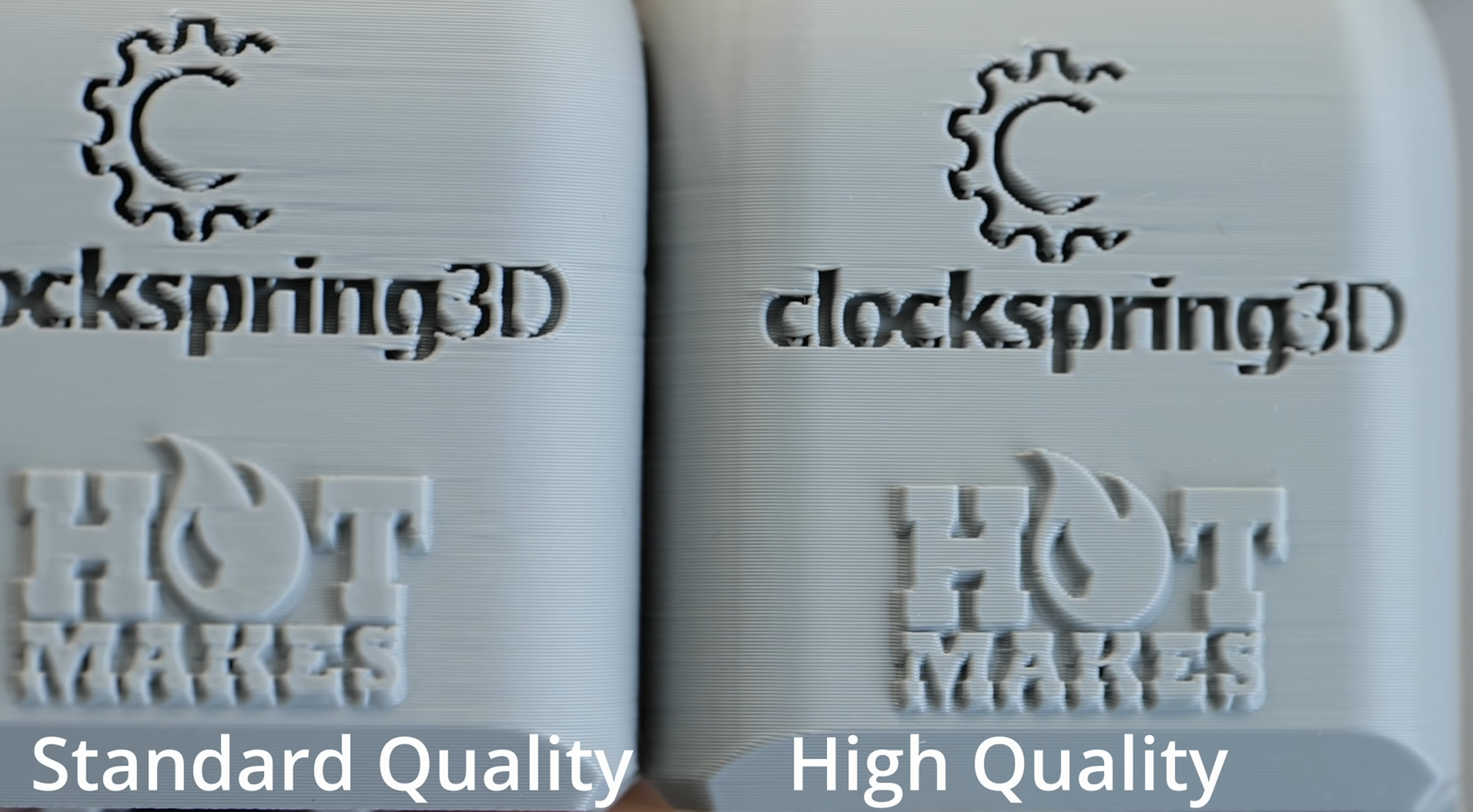
Image from CNC Kitchen H3C Video on YouTube printing a test, looking at print quality. I find both settings are fairly underwhelming.
How the H3C compares to the market tool changers
From a technical standpoint, the H3C does stand out quite a bit.
| Bambu Lab H3C | Creality K3 | Flashforge Creator 5 Pro | Snapmaker U1 | Prusa XL (5T) | Core One+ INDX (8T) | |
|---|---|---|---|---|---|---|
| Price | $2,499 AMS Combo |
$849 Pre order |
$689 with codes, $849 list |
$699 $999 list |
$3,899 assembled |
$2,249 assembled, 8 tools |
| Max tools | 9, up to 24 colours with AMS on tool #1 | 4 | 4 | 4 | 1-5 | 4-8 |
| Build volume | 330 × 320 × 325 mm | 260³ mm | 256³ mm | 270³ mm | 360³ mm | ~250 × 210 × 220 mm |
| Tool change | 6–7s | 15s (claimed) | 22s, with tower | 10–12s | 12-17s | 12–16s |
| Waste per change | ~50 mg m, tower required | TBD | Near-zero, tower rec. | Near-zero, tower rec. | Near-zero, tower rec. | ~13 mg, no tower |
| Chamber | Active, 65 °C | No | Active, 65 °C | Open, $149 cover | Optional enclosure | Active, 55 °C |
| Soft TPU | 75A (60A shown), 2.85 mm tool | 80A claimed | 95A | 95A | 95A | 85A |
| Filament loading | Automatic, RFID. Manual for soft filament | TBD | Manual | Automatic, NFC | Manual | Manual |
| Firmware | Proprietary, LAN-only mode | "Open" | Proprietary | Klipper, open | Open source | Open source |
| Price tracking | 3dp.sale | 3dp.sale | 3dp.sale | 3dp.sale | 3dp.sale | 3dp.sale |
Not in the table: the rumored P3C, seven tools in a P-series body, no price or date yet. What’s known so far is in my third-generation leak post: https://www.antonmansson.com/3d-printing-blog/bambu-lab-h3c-p3c-x2d-pro-s1-scanner
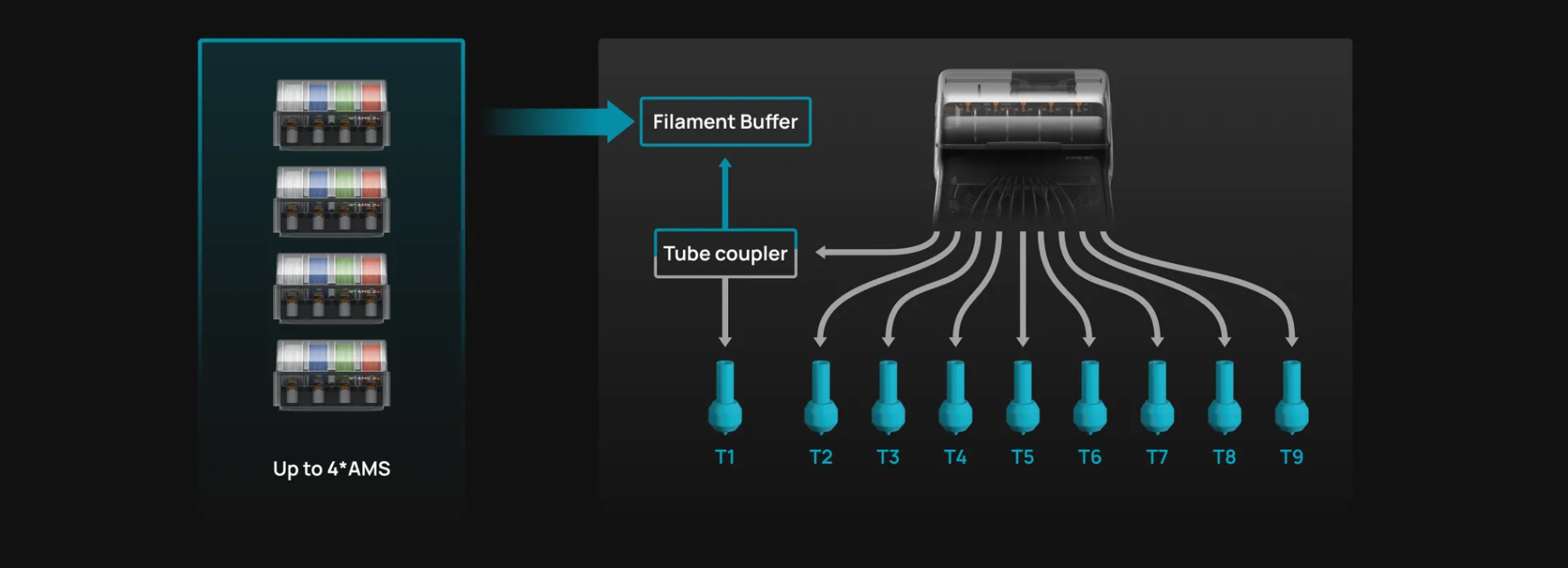
The maximum amount of AMS and colors the H3C can run. Notice the speed bonus of individual tool heads doesn’t apply across all 24 colors since the additional ones has to travel through the first tool.
Multiple nozzle sizes in tools
The H3C is the first of Bambu Labs multi-nozzle 3D printers to let you combine nozzle sizes in a single print. For example using 0.2mm details on a 0.4mm print, to add detail where it matters.
While this is really cool, how you implement it can become a bit more tricky. As Thomas Sanladerer talks about in his video, the mix is treated as a normal tool-change, so a prime tower is needed, which can slow down any “single-color-but-different-nozzle-size” prints. He also notes that the paint-in method of adding details to areas like text ends up showing quite visible shifts.
I’m convinced this will improve, and the paint-in method is probably the issue in the example below. Mixing when using support materials or internal structures for example might more sense.
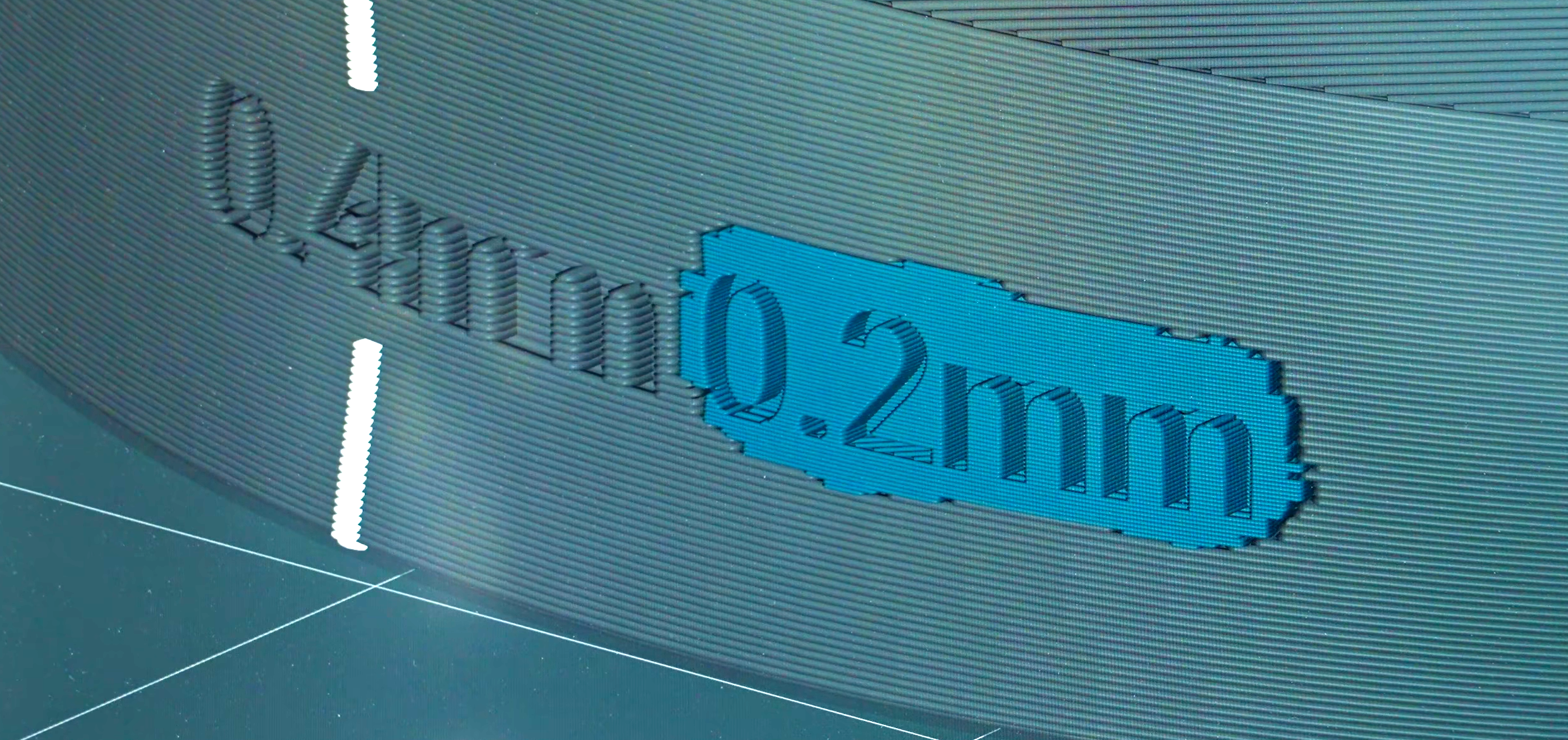
An example from Made With Layers (Thomas Sanladerer) video showing paint-in-0.2mm-nozzle and the result.
“H” for Hybrid Crafting
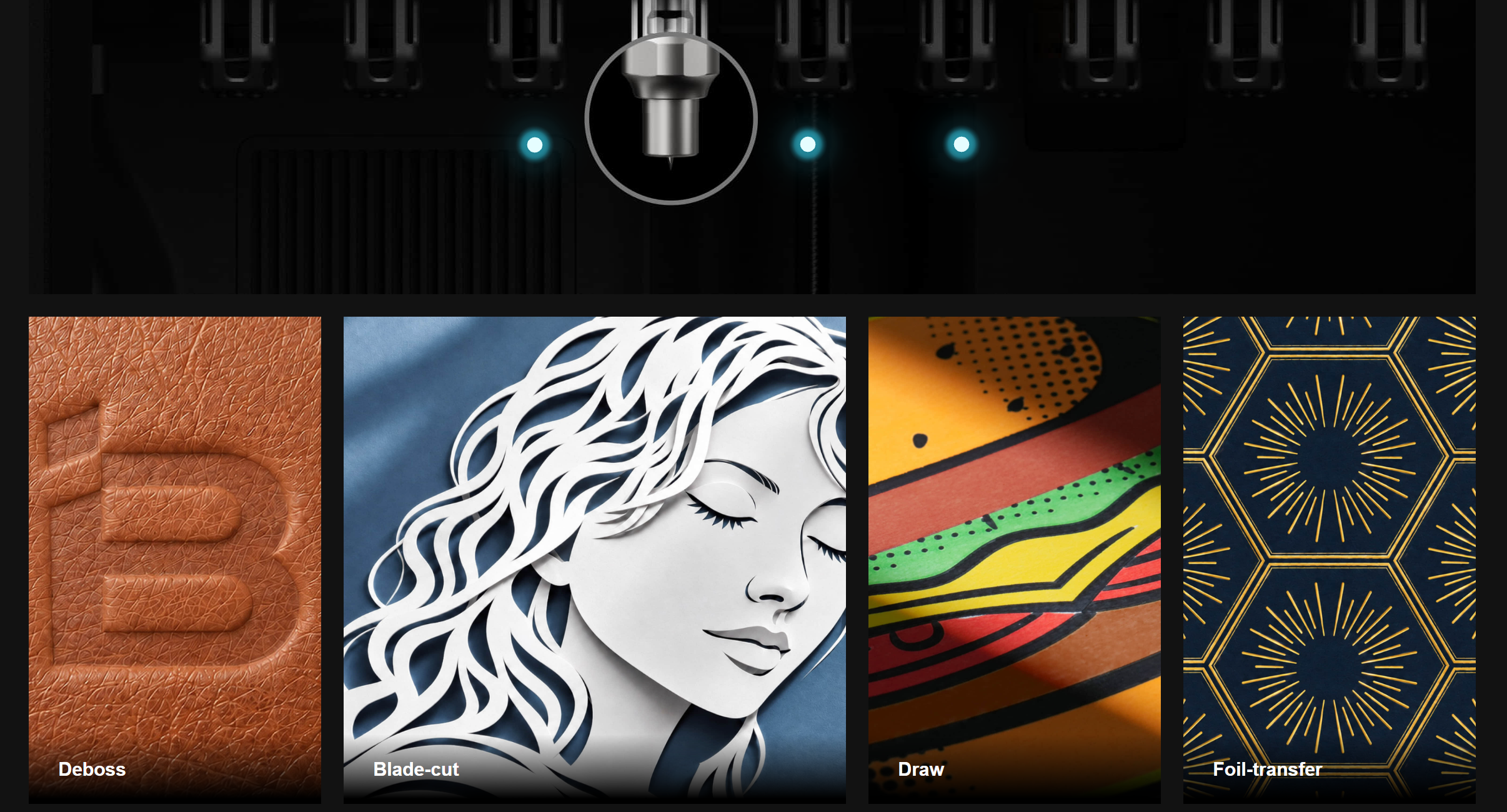
Although there is no space for a laser module, there are crafting tool heads for cutting, drawing and embossing. That means you really can set it up as a hybrid crafting station to create drawings, cut patterns or vinyl, as well as embossing or foil transfer.
This opens up a lot of additional value if you run a small business or “etsy-shop”. Having one machine both produce parts, but also cut stickers or create packaging material and much more can be valuable.
Who is the H3C really for?
The H3C is the current Bambu Lab flagship 3D Printer and I think you should treat it as the multi-material and color champion that it is. Its designed to minimize waste, speed up multi-color or material printing while improving new “unique” areas of multi-TPU printing in soft materials. A very forward-looking approach to what people are printing.
We should note this isn’t officially a “Pro” machine, but still offer hardened nozzles and printing up to 350°C and 120°C on the plate, with active heating to 65°C in the chamber, same as the H2D Pro, while the Pro uses HRA90 tungsten carbide nozzles compared to the hardened steel HRC55 (~78.5 HRA) nozzles on H3C. Other “Pro” features like LAN-port, WPA2-Enterprise Wi-Fi and Network Kill Switch are lacking on the H3C.
This is a hybrid machine, made to do a lot of things, while not bad at it, its not the best on engineering grade materials either. Its actually a very good flexible machine for loads of applications. While more specialized needs might steer towards the H2D Pro or even upcoming P3C (that most likely wont have active drying the the AMS 3P) and probably focus on multi-color than the 2.85mm TPU tool.
What others are saying about the H3C
After watching CNC Kitchen, Thomas Sanladerer and 3D Printing Nerd videos on the H3C I feel like they agree that the 2.85 mm tool is the H3C’s real advantage, printing TPU as soft as 60A and combining it with rigid materials in the same part.
The rapid tool changes and waste are roughly the same waste as the Core One INDX but far quicker than the H2C. They mention print quality out of the box as “very good”, although the standard profiles run fast enough to leave visible artifacts which anyone watching the videos will see…
The AMS 3H gets the most criticism from them: only two slots can dry filament, and every spool change has to be initiated from the machine (not like current AMS where you just drag it out). The machine is also so tall that the Bambu Station is close to a requirement rather than an extra, and some parts, like the screen and side windows, are a step down from the H2C. The overall verdict is a very capable printer for multicolor and multi-material work, but one that’s hard to justify if you mostly print in one or two materials.
Frequently asked questions
How much does the Bambu Lab H3C cost?
The H3C AMS Combo costs $2,499 in the US, €2,499 in the EU and £2,199 in the UK. That price includes the printer and the AMS 3H, which is the top cover of the machine and not optional. Bundles with the Bambu Station start at $2,799.
Is the H3C a tool changer or a nozzle changer?
It is a tool changer, although a lightweight one. Each of the nine tools has its own hotend, heater and filament path, while the extruder motor and gears stay on the print head. That puts it closer to the Bondtech INDX and Creality K3 than to the Snapmaker U1, where the whole head is swapped.
How fast is a tool change on the H3C?
Bambu Lab claims under 6 seconds. CNC Kitchen measured 6 to 7 seconds from print to print, and a little over 10 seconds when the tool also prints the outer wall of the prime tower. The H2C needs 30 to 40 seconds because it retracts the filament to the AMS on every change.
Does the H3C still need a prime tower?
Yes. There is no purging like on a single-nozzle AMS printer, but every tool change primes about 50 mg of filament onto a prime tower. That is far less waste than an AMS print, though it is not zero.
Can the H3C print soft TPU?
Yes, and it is the main reason to choose this printer. Tool 8 takes 2.85 mm filament, which is stiff enough to feed very soft TPU reliably and fast. Bambu Lab sells a 75A TPU for it, and CNC Kitchen printed 60A. Soft filament is loaded by hand through a bypass, not through the AMS feeder.
Can the H3C print more than nine colours?
Yes, up to 24, by connecting extra AMS units to tool 1. Those extra colours all share one nozzle, so they change slower and purge like a normal AMS print. The fast tool changes only apply to the nine tools.
Can you use the H3C without the AMS 3H?
No. The AMS 3H is the top cover of the printer and the tools connect to it, so the H3C is only sold as a combo. Two of its nine slots can dry filament at up to 85 °C.
Should I buy the H3C or the H2C?
Choose the H3C for multi-colour and multi-material printing, or if you want soft TPU. If you mostly print one or two materials, the H2C or H2D gives you the same build volume and a heated chamber for less money.
Should I wait for the Bambu Lab P3C?
The P3C is still a rumour: seven tools in a smaller P-series body, with no price or date. I expect it to focus on multi-colour printing and to skip the 2.85 mm TPU tool. If you need the build volume, the heated chamber or soft TPU now, there is little reason to wait.
